> ## Documentation Index
> Fetch the complete documentation index at: https://docs-staging-react-sdk-reference.mintlify.site/llms.txt
> Use this file to discover all available pages before exploring further.

> Learn how to configure an update policy form using Forms for Actions for users to review and accept new terms of service or consent updates.

# Use Cases: Configure an update policy form using Forms

<Card title="Before you start">
  1. Create a [Machine-to-Machine Application](/docs/get-started/auth0-overview/create-applications/machine-to-machine-apps) with the following scopes enabled:

  * `read:users`
  * `update:users`
  * `create:users`
  * `read:users_app_metadata`
  * `update:users_app_metadata`
  * `create:users_app_metadata`

  2. Add a [Vault connection](/docs/customize/forms/vault) using the M2M application credentials.
</Card>

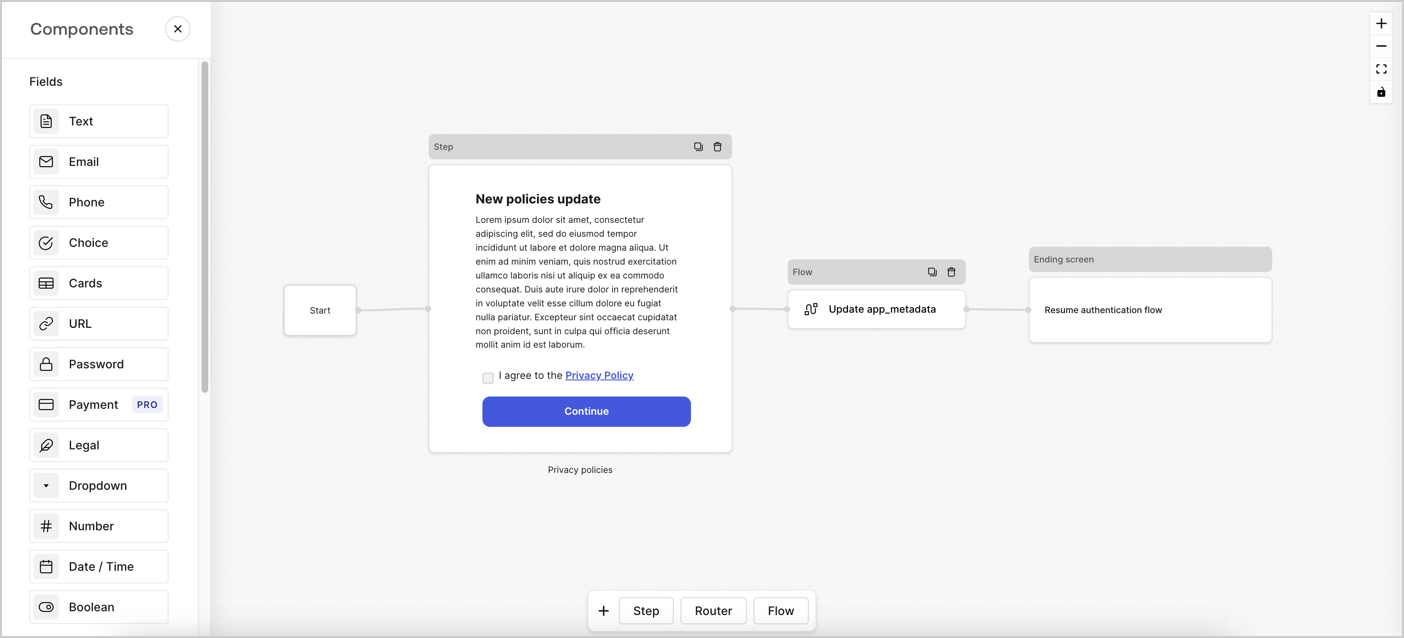
Forms for Actions allows you to create custom privacy policies flows and store the consent under the `app_metadata` object.
<Frame>
  <img src="https://mintcdn.com/docs-staging-react-sdk-reference/sbGs5QIsX_eL2Kb9/docs/images/cdy7uua7fh8z/6i68dMvHDTijfRmSgN1x8Q/ad900e7d4c0fb34645921435472b8684/privavy-policy-form.png?fit=max&auto=format&n=sbGs5QIsX_eL2Kb9&q=85&s=37bce5fc409e659b6d26a24ff82096e8" alt="Dashboard > Actions > Forms > Privacy policy use case" data-og-width="1404" width="1404" data-og-height="638" height="638" data-path="docs/images/cdy7uua7fh8z/6i68dMvHDTijfRmSgN1x8Q/ad900e7d4c0fb34645921435472b8684/privavy-policy-form.png" data-optimize="true" data-opv="3" srcset="https://mintcdn.com/docs-staging-react-sdk-reference/sbGs5QIsX_eL2Kb9/docs/images/cdy7uua7fh8z/6i68dMvHDTijfRmSgN1x8Q/ad900e7d4c0fb34645921435472b8684/privavy-policy-form.png?w=280&fit=max&auto=format&n=sbGs5QIsX_eL2Kb9&q=85&s=694477cf0b9bf56c6081c11bd9303646 280w, https://mintcdn.com/docs-staging-react-sdk-reference/sbGs5QIsX_eL2Kb9/docs/images/cdy7uua7fh8z/6i68dMvHDTijfRmSgN1x8Q/ad900e7d4c0fb34645921435472b8684/privavy-policy-form.png?w=560&fit=max&auto=format&n=sbGs5QIsX_eL2Kb9&q=85&s=9a0d24b9429bf8f9a2791b0a1c854cbe 560w, https://mintcdn.com/docs-staging-react-sdk-reference/sbGs5QIsX_eL2Kb9/docs/images/cdy7uua7fh8z/6i68dMvHDTijfRmSgN1x8Q/ad900e7d4c0fb34645921435472b8684/privavy-policy-form.png?w=840&fit=max&auto=format&n=sbGs5QIsX_eL2Kb9&q=85&s=9e9a673e85f61b89548f2ae897b78d17 840w, https://mintcdn.com/docs-staging-react-sdk-reference/sbGs5QIsX_eL2Kb9/docs/images/cdy7uua7fh8z/6i68dMvHDTijfRmSgN1x8Q/ad900e7d4c0fb34645921435472b8684/privavy-policy-form.png?w=1100&fit=max&auto=format&n=sbGs5QIsX_eL2Kb9&q=85&s=d9d1c2da70cdd6fc4c1fbfcd3bae2cbc 1100w, https://mintcdn.com/docs-staging-react-sdk-reference/sbGs5QIsX_eL2Kb9/docs/images/cdy7uua7fh8z/6i68dMvHDTijfRmSgN1x8Q/ad900e7d4c0fb34645921435472b8684/privavy-policy-form.png?w=1650&fit=max&auto=format&n=sbGs5QIsX_eL2Kb9&q=85&s=987e6141acd54f7153c1b7de013d614b 1650w, https://mintcdn.com/docs-staging-react-sdk-reference/sbGs5QIsX_eL2Kb9/docs/images/cdy7uua7fh8z/6i68dMvHDTijfRmSgN1x8Q/ad900e7d4c0fb34645921435472b8684/privavy-policy-form.png?w=2500&fit=max&auto=format&n=sbGs5QIsX_eL2Kb9&q=85&s=c09536a889e7dff311183a0c2fbca7ae 2500w" />
</Frame>

The sections below outline how you can create an Update Policy form using nodes and flows, along with steps for adding your form to a [Post Login](/docs/customize/actions/explore-triggers/signup-and-login-triggers/login-trigger) Action.

## Create a form from scratch

Follow these steps to create a form to gather information:

1. Open the Form editor by selecting **Auth0 Dashboard > Actions > Forms.**
2. Select **Create Form** > **Start from scratch**.

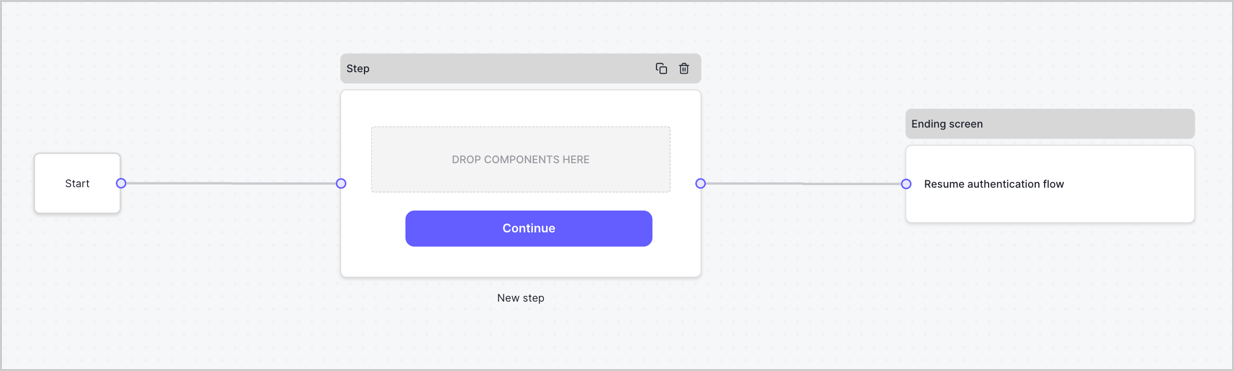
By default, a new form contains a Start node, a Step node, and an Ending screen node.
<Frame>
  <img src="https://mintcdn.com/docs-staging-react-sdk-reference/L2TMZX9G2VWE4CRt/docs/images/cdy7uua7fh8z/2TZ9jSjgEcARFpULI6hz4R/a4319a1bd482f2ee5cc23100fdb2f42c/New-form-Forms-for-action-use-case.png?fit=max&auto=format&n=L2TMZX9G2VWE4CRt&q=85&s=701bdf9ec595d8fd0c0bb7a27a1fca5c" alt="Dashboard > Forms > Use Cases > Form" data-og-width="1234" width="1234" data-og-height="371" height="371" data-path="docs/images/cdy7uua7fh8z/2TZ9jSjgEcARFpULI6hz4R/a4319a1bd482f2ee5cc23100fdb2f42c/New-form-Forms-for-action-use-case.png" data-optimize="true" data-opv="3" srcset="https://mintcdn.com/docs-staging-react-sdk-reference/L2TMZX9G2VWE4CRt/docs/images/cdy7uua7fh8z/2TZ9jSjgEcARFpULI6hz4R/a4319a1bd482f2ee5cc23100fdb2f42c/New-form-Forms-for-action-use-case.png?w=280&fit=max&auto=format&n=L2TMZX9G2VWE4CRt&q=85&s=a70b94325006984366bf78ecc7d44682 280w, https://mintcdn.com/docs-staging-react-sdk-reference/L2TMZX9G2VWE4CRt/docs/images/cdy7uua7fh8z/2TZ9jSjgEcARFpULI6hz4R/a4319a1bd482f2ee5cc23100fdb2f42c/New-form-Forms-for-action-use-case.png?w=560&fit=max&auto=format&n=L2TMZX9G2VWE4CRt&q=85&s=ccf32ab2599a366ffed43778e6be7294 560w, https://mintcdn.com/docs-staging-react-sdk-reference/L2TMZX9G2VWE4CRt/docs/images/cdy7uua7fh8z/2TZ9jSjgEcARFpULI6hz4R/a4319a1bd482f2ee5cc23100fdb2f42c/New-form-Forms-for-action-use-case.png?w=840&fit=max&auto=format&n=L2TMZX9G2VWE4CRt&q=85&s=054ad03b9666e32765e850a9dbbf5b08 840w, https://mintcdn.com/docs-staging-react-sdk-reference/L2TMZX9G2VWE4CRt/docs/images/cdy7uua7fh8z/2TZ9jSjgEcARFpULI6hz4R/a4319a1bd482f2ee5cc23100fdb2f42c/New-form-Forms-for-action-use-case.png?w=1100&fit=max&auto=format&n=L2TMZX9G2VWE4CRt&q=85&s=1688f9665a44cebc73f8ec07e96dfe89 1100w, https://mintcdn.com/docs-staging-react-sdk-reference/L2TMZX9G2VWE4CRt/docs/images/cdy7uua7fh8z/2TZ9jSjgEcARFpULI6hz4R/a4319a1bd482f2ee5cc23100fdb2f42c/New-form-Forms-for-action-use-case.png?w=1650&fit=max&auto=format&n=L2TMZX9G2VWE4CRt&q=85&s=edaaeed94b8c7d8b23f109a31d0b152d 1650w, https://mintcdn.com/docs-staging-react-sdk-reference/L2TMZX9G2VWE4CRt/docs/images/cdy7uua7fh8z/2TZ9jSjgEcARFpULI6hz4R/a4319a1bd482f2ee5cc23100fdb2f42c/New-form-Forms-for-action-use-case.png?w=2500&fit=max&auto=format&n=L2TMZX9G2VWE4CRt&q=85&s=eac3c502410e9fcd5e6da2fbeaac3471 2500w" />
</Frame>

### Configure the Step node

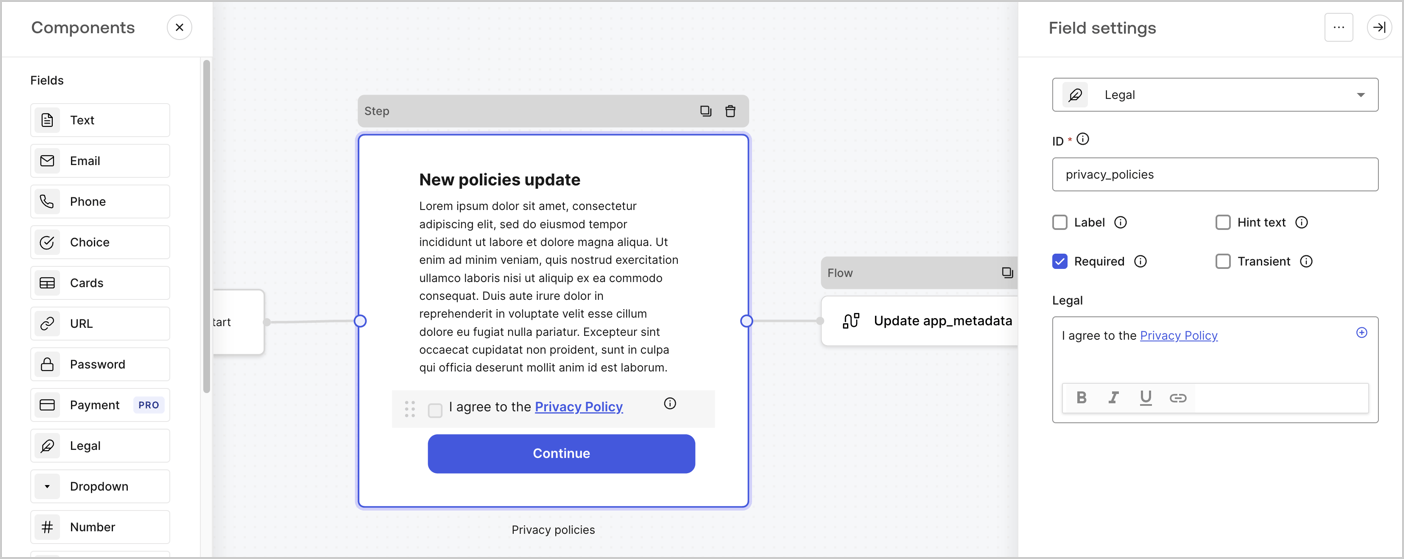
The Step node is the graphical interface visible to users. Add [Fields](/docs/customize/forms/nodes-and-components) to the Step node to collect the new agreement acceptance value by following these steps:

1. Drag a **Rich text** field from the **Components menu** into the **Step** node.

   * **Rich text**: Enter a description of your privacy policies updates.
   * Select **Save**.
2. Drag a **Legal** field into the **Step** node.

   * **ID**: Enter `privacy_policies`.
   * **Required**: Enable the checkbox.
   * **Legal**: Enter `I agree to the Privacy Policy`.
   * Select **Save**.
3. Select **Publish** to save.
<Frame>
  <img src="https://mintcdn.com/docs-staging-react-sdk-reference/MICTklUMWIDHSton/docs/images/cdy7uua7fh8z/59zFFjQjAnjogkc2QGIqqJ/0ad66b1b636544122aa4e65968b76c2c/privacy-policy-step-node.png?fit=max&auto=format&n=MICTklUMWIDHSton&q=85&s=cabfbd41056205e8819cc709c933208b" alt="Dashboard > Actions > Forms > Use case privacy policy step node" data-og-width="1404" width="1404" data-og-height="559" height="559" data-path="docs/images/cdy7uua7fh8z/59zFFjQjAnjogkc2QGIqqJ/0ad66b1b636544122aa4e65968b76c2c/privacy-policy-step-node.png" data-optimize="true" data-opv="3" srcset="https://mintcdn.com/docs-staging-react-sdk-reference/MICTklUMWIDHSton/docs/images/cdy7uua7fh8z/59zFFjQjAnjogkc2QGIqqJ/0ad66b1b636544122aa4e65968b76c2c/privacy-policy-step-node.png?w=280&fit=max&auto=format&n=MICTklUMWIDHSton&q=85&s=ca0c8406fc0b604fc277edf6e98aeb24 280w, https://mintcdn.com/docs-staging-react-sdk-reference/MICTklUMWIDHSton/docs/images/cdy7uua7fh8z/59zFFjQjAnjogkc2QGIqqJ/0ad66b1b636544122aa4e65968b76c2c/privacy-policy-step-node.png?w=560&fit=max&auto=format&n=MICTklUMWIDHSton&q=85&s=b523449775bfd0f40eaa4d13ad4bf98f 560w, https://mintcdn.com/docs-staging-react-sdk-reference/MICTklUMWIDHSton/docs/images/cdy7uua7fh8z/59zFFjQjAnjogkc2QGIqqJ/0ad66b1b636544122aa4e65968b76c2c/privacy-policy-step-node.png?w=840&fit=max&auto=format&n=MICTklUMWIDHSton&q=85&s=933e6b56831b3c212ab153569140e428 840w, https://mintcdn.com/docs-staging-react-sdk-reference/MICTklUMWIDHSton/docs/images/cdy7uua7fh8z/59zFFjQjAnjogkc2QGIqqJ/0ad66b1b636544122aa4e65968b76c2c/privacy-policy-step-node.png?w=1100&fit=max&auto=format&n=MICTklUMWIDHSton&q=85&s=9de189d62347a4e661d57e5b6ba3277b 1100w, https://mintcdn.com/docs-staging-react-sdk-reference/MICTklUMWIDHSton/docs/images/cdy7uua7fh8z/59zFFjQjAnjogkc2QGIqqJ/0ad66b1b636544122aa4e65968b76c2c/privacy-policy-step-node.png?w=1650&fit=max&auto=format&n=MICTklUMWIDHSton&q=85&s=44f129c6097366928c07825dddd24f31 1650w, https://mintcdn.com/docs-staging-react-sdk-reference/MICTklUMWIDHSton/docs/images/cdy7uua7fh8z/59zFFjQjAnjogkc2QGIqqJ/0ad66b1b636544122aa4e65968b76c2c/privacy-policy-step-node.png?w=2500&fit=max&auto=format&n=MICTklUMWIDHSton&q=85&s=341cf4015456a702ecc94f6c3621f117 2500w" />
</Frame>

### Configure the Flow node

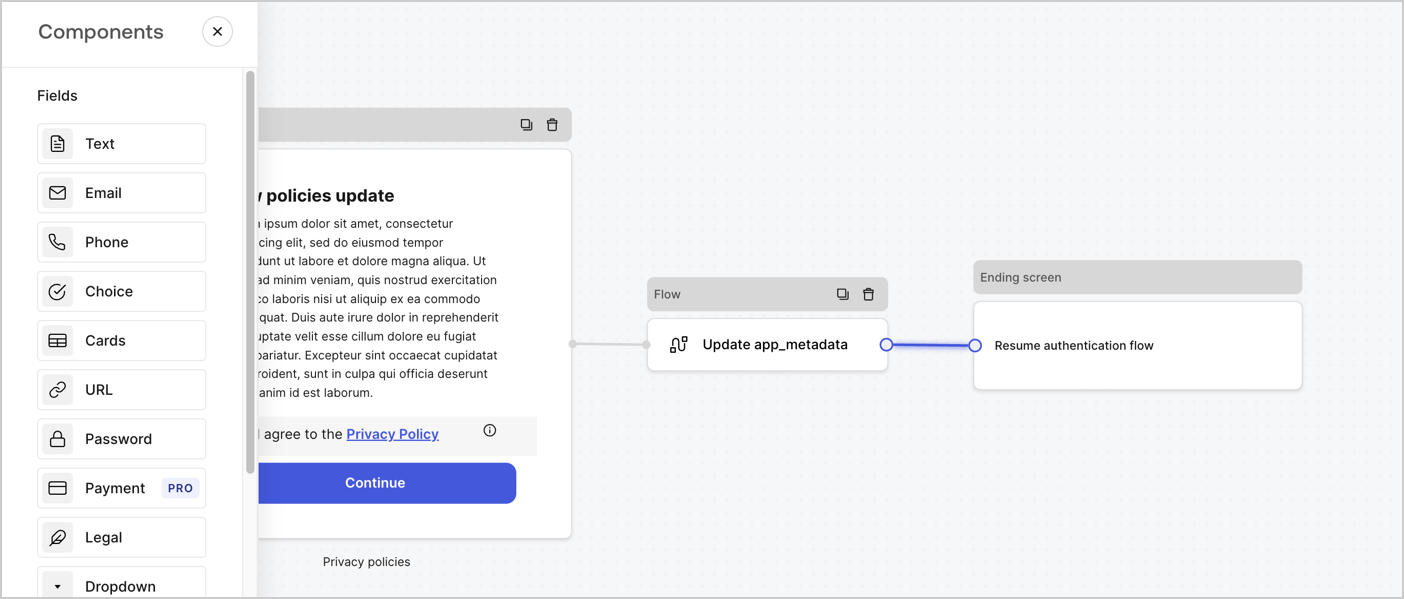
Add a **Flow** node after the **Step** node to update the `app_metadata` and resume the authentication flow by following these steps:

1. Select **Flow** from the bottom of the Form editor.
2. Remove the existing link between the **Step** and **Ending Screen** nodes.
3. Select the new **Flow** > **Click to add a flow** > **Create a new flow.**

   * Enter `Update app_metadata` in the **Name** field.
   * Select **Create**.
   * Select **Save**.
4. Link the **Flow** node to the **Step** and **Ending Screen** nodes as pictured below.
5. Select **Publish** to save.
<Frame>
  <img src="https://mintcdn.com/docs-staging-react-sdk-reference/sbGs5QIsX_eL2Kb9/docs/images/cdy7uua7fh8z/6YIkzm7SrpM9LW76AXuRzh/353c518fe82bbaa440836da1d83596d6/link-policies.png?fit=max&auto=format&n=sbGs5QIsX_eL2Kb9&q=85&s=ccd47b54f048755e11125fbdcad32e31" alt="Dashboard > Actions > Forms > Form" data-og-width="1404" width="1404" data-og-height="599" height="599" data-path="docs/images/cdy7uua7fh8z/6YIkzm7SrpM9LW76AXuRzh/353c518fe82bbaa440836da1d83596d6/link-policies.png" data-optimize="true" data-opv="3" srcset="https://mintcdn.com/docs-staging-react-sdk-reference/sbGs5QIsX_eL2Kb9/docs/images/cdy7uua7fh8z/6YIkzm7SrpM9LW76AXuRzh/353c518fe82bbaa440836da1d83596d6/link-policies.png?w=280&fit=max&auto=format&n=sbGs5QIsX_eL2Kb9&q=85&s=0b611f9180952b975c181e66575d631a 280w, https://mintcdn.com/docs-staging-react-sdk-reference/sbGs5QIsX_eL2Kb9/docs/images/cdy7uua7fh8z/6YIkzm7SrpM9LW76AXuRzh/353c518fe82bbaa440836da1d83596d6/link-policies.png?w=560&fit=max&auto=format&n=sbGs5QIsX_eL2Kb9&q=85&s=878a0d272cddc04625485f6ab456f31e 560w, https://mintcdn.com/docs-staging-react-sdk-reference/sbGs5QIsX_eL2Kb9/docs/images/cdy7uua7fh8z/6YIkzm7SrpM9LW76AXuRzh/353c518fe82bbaa440836da1d83596d6/link-policies.png?w=840&fit=max&auto=format&n=sbGs5QIsX_eL2Kb9&q=85&s=76400d54451f5c5e31b06ab4ffb30b86 840w, https://mintcdn.com/docs-staging-react-sdk-reference/sbGs5QIsX_eL2Kb9/docs/images/cdy7uua7fh8z/6YIkzm7SrpM9LW76AXuRzh/353c518fe82bbaa440836da1d83596d6/link-policies.png?w=1100&fit=max&auto=format&n=sbGs5QIsX_eL2Kb9&q=85&s=a3864425f145cf20f38b4663b65a7afa 1100w, https://mintcdn.com/docs-staging-react-sdk-reference/sbGs5QIsX_eL2Kb9/docs/images/cdy7uua7fh8z/6YIkzm7SrpM9LW76AXuRzh/353c518fe82bbaa440836da1d83596d6/link-policies.png?w=1650&fit=max&auto=format&n=sbGs5QIsX_eL2Kb9&q=85&s=89be7a2cd82472a6a760e31433885993 1650w, https://mintcdn.com/docs-staging-react-sdk-reference/sbGs5QIsX_eL2Kb9/docs/images/cdy7uua7fh8z/6YIkzm7SrpM9LW76AXuRzh/353c518fe82bbaa440836da1d83596d6/link-policies.png?w=2500&fit=max&auto=format&n=sbGs5QIsX_eL2Kb9&q=85&s=c085cc29bd5085ef1ed7e9b4fe5d0590 2500w" />
</Frame>

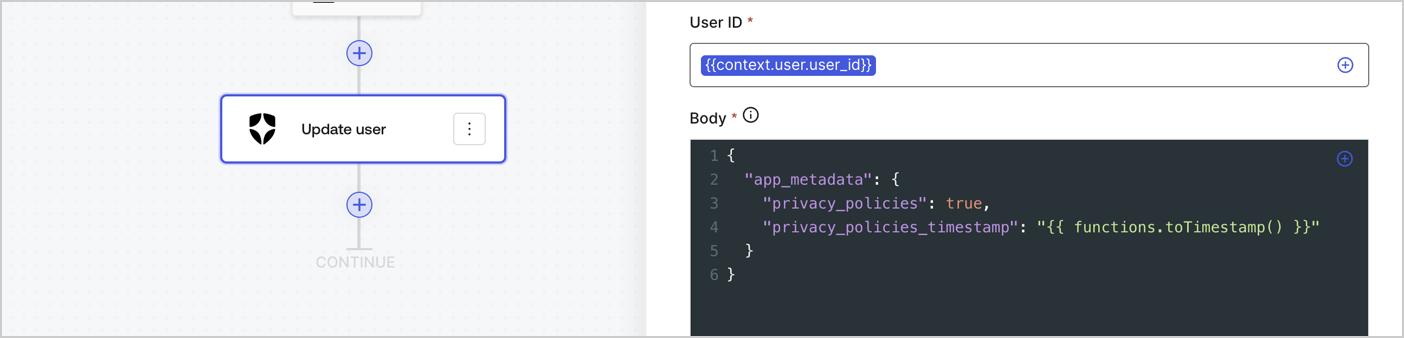
Add an Auth0 Update user action to the flow by following these steps:

1. Select the **Flow** **Update app\_metadata** > **Edit flow** to open the Flow editor in a new tab.
2. Below the StartAction, select the **+** icon to add an **Update user** action. Complete the fields below, then select **Save** to continue.

   * **Connection**: Select from the dropdown the Vault connection to your M2M application.

   * **User ID**: Enter `{{context.user.user_id}}`.

   * **Body**: Copy and paste the following code to update the app\_metadata with the privacy\_policies and privacy\_policies\_timestamp properties.

     ```text lines theme={null}
     {
       "app_metadata": {
         "privacy_policies": true,
         "privacy_policies_timestamp": "{{ functions.toTimestamp() }}"
       }
     }
     ```

   * Select **Save**.
3. Select **Publish** to save.
<Frame>
  <img src="https://mintcdn.com/docs-staging-react-sdk-reference/BVew-5hUhpnwGoy6/docs/images/cdy7uua7fh8z/CvMNIwWrOUwaFW4X3G28p/1fb70ae57a20749d9ffaaba8dc0b7e26/update-user-privacy.png?fit=max&auto=format&n=BVew-5hUhpnwGoy6&q=85&s=1fe515cc6d73bf6a3e4900b6960d2c16" alt="Dashboard > Actions > Forms > User case privacy policy code" data-og-width="1404" width="1404" data-og-height="338" height="338" data-path="docs/images/cdy7uua7fh8z/CvMNIwWrOUwaFW4X3G28p/1fb70ae57a20749d9ffaaba8dc0b7e26/update-user-privacy.png" data-optimize="true" data-opv="3" srcset="https://mintcdn.com/docs-staging-react-sdk-reference/BVew-5hUhpnwGoy6/docs/images/cdy7uua7fh8z/CvMNIwWrOUwaFW4X3G28p/1fb70ae57a20749d9ffaaba8dc0b7e26/update-user-privacy.png?w=280&fit=max&auto=format&n=BVew-5hUhpnwGoy6&q=85&s=6fb82cb5f15eb913125e1e166575a31f 280w, https://mintcdn.com/docs-staging-react-sdk-reference/BVew-5hUhpnwGoy6/docs/images/cdy7uua7fh8z/CvMNIwWrOUwaFW4X3G28p/1fb70ae57a20749d9ffaaba8dc0b7e26/update-user-privacy.png?w=560&fit=max&auto=format&n=BVew-5hUhpnwGoy6&q=85&s=8a01725cf8e55d0e2568269bfbea39e5 560w, https://mintcdn.com/docs-staging-react-sdk-reference/BVew-5hUhpnwGoy6/docs/images/cdy7uua7fh8z/CvMNIwWrOUwaFW4X3G28p/1fb70ae57a20749d9ffaaba8dc0b7e26/update-user-privacy.png?w=840&fit=max&auto=format&n=BVew-5hUhpnwGoy6&q=85&s=dfc1efddd5952e7f188d6870c5fc167d 840w, https://mintcdn.com/docs-staging-react-sdk-reference/BVew-5hUhpnwGoy6/docs/images/cdy7uua7fh8z/CvMNIwWrOUwaFW4X3G28p/1fb70ae57a20749d9ffaaba8dc0b7e26/update-user-privacy.png?w=1100&fit=max&auto=format&n=BVew-5hUhpnwGoy6&q=85&s=8f53cb4129999d52df714a19df167131 1100w, https://mintcdn.com/docs-staging-react-sdk-reference/BVew-5hUhpnwGoy6/docs/images/cdy7uua7fh8z/CvMNIwWrOUwaFW4X3G28p/1fb70ae57a20749d9ffaaba8dc0b7e26/update-user-privacy.png?w=1650&fit=max&auto=format&n=BVew-5hUhpnwGoy6&q=85&s=4bb39da8381808b0caf1c57cdd88a843 1650w, https://mintcdn.com/docs-staging-react-sdk-reference/BVew-5hUhpnwGoy6/docs/images/cdy7uua7fh8z/CvMNIwWrOUwaFW4X3G28p/1fb70ae57a20749d9ffaaba8dc0b7e26/update-user-privacy.png?w=2500&fit=max&auto=format&n=BVew-5hUhpnwGoy6&q=85&s=4800f47238c99da9d73f3c3804fcc9d1 2500w" />
</Frame>

<Callout icon="file-lines" color="#0EA5E9" iconType="regular">
  The flow **Update app\_metadata** adds a `privacy_policies true` value to the app`_metadata` object and also generates a timestamp with a [helper function.](/docs/customize/forms/variables)
</Callout>

## Retrieve the form render code

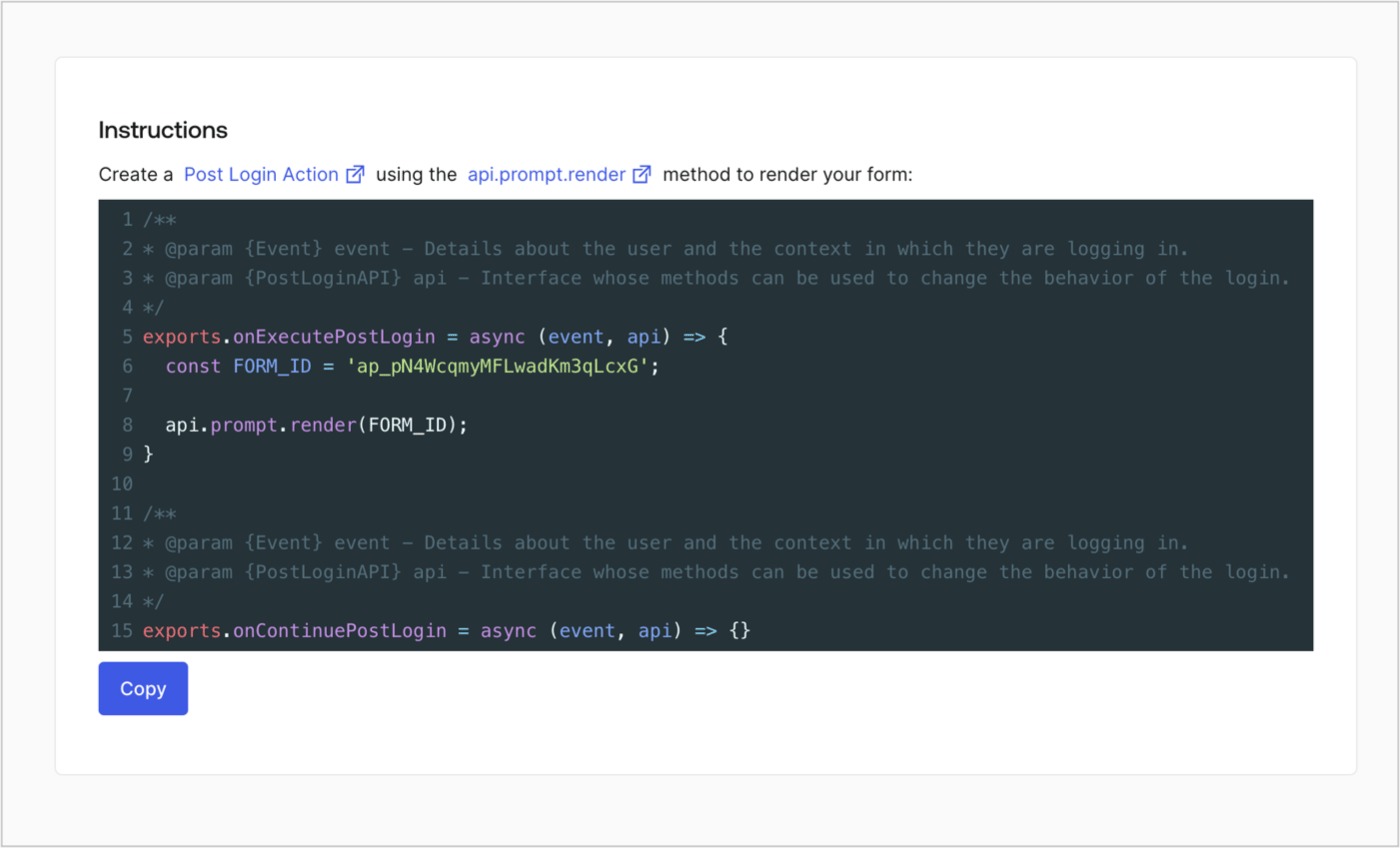
Retrieve your form render code to visually render the form with a custom Post Login Action by following these steps:

* From the Form editor, select **`<> Render`**.
* Select **Copy**.
<Frame>
  <img src="https://mintcdn.com/docs-staging-react-sdk-reference/mtmpmRgg8CFqUkGT/docs/images/cdy7uua7fh8z/2EIUzc539sq9lwoTKbjoJv/496a864c0fc44a782c9cadca119dbfb0/embed.png?fit=max&auto=format&n=mtmpmRgg8CFqUkGT&q=85&s=633834abed8221734f2262aa477e9819" alt="Dashboard > Actions > Forms > Form > Embed" data-og-width="1400" width="1400" data-og-height="848" height="848" data-path="docs/images/cdy7uua7fh8z/2EIUzc539sq9lwoTKbjoJv/496a864c0fc44a782c9cadca119dbfb0/embed.png" data-optimize="true" data-opv="3" srcset="https://mintcdn.com/docs-staging-react-sdk-reference/mtmpmRgg8CFqUkGT/docs/images/cdy7uua7fh8z/2EIUzc539sq9lwoTKbjoJv/496a864c0fc44a782c9cadca119dbfb0/embed.png?w=280&fit=max&auto=format&n=mtmpmRgg8CFqUkGT&q=85&s=3c7aab01d67754450949e536ac952ca3 280w, https://mintcdn.com/docs-staging-react-sdk-reference/mtmpmRgg8CFqUkGT/docs/images/cdy7uua7fh8z/2EIUzc539sq9lwoTKbjoJv/496a864c0fc44a782c9cadca119dbfb0/embed.png?w=560&fit=max&auto=format&n=mtmpmRgg8CFqUkGT&q=85&s=fc01d5289e507847f25c441cd003a7b1 560w, https://mintcdn.com/docs-staging-react-sdk-reference/mtmpmRgg8CFqUkGT/docs/images/cdy7uua7fh8z/2EIUzc539sq9lwoTKbjoJv/496a864c0fc44a782c9cadca119dbfb0/embed.png?w=840&fit=max&auto=format&n=mtmpmRgg8CFqUkGT&q=85&s=3b1c0eb8990693fb261220f88a452f68 840w, https://mintcdn.com/docs-staging-react-sdk-reference/mtmpmRgg8CFqUkGT/docs/images/cdy7uua7fh8z/2EIUzc539sq9lwoTKbjoJv/496a864c0fc44a782c9cadca119dbfb0/embed.png?w=1100&fit=max&auto=format&n=mtmpmRgg8CFqUkGT&q=85&s=c96c5bc4e63fd8c07b79672566aa457b 1100w, https://mintcdn.com/docs-staging-react-sdk-reference/mtmpmRgg8CFqUkGT/docs/images/cdy7uua7fh8z/2EIUzc539sq9lwoTKbjoJv/496a864c0fc44a782c9cadca119dbfb0/embed.png?w=1650&fit=max&auto=format&n=mtmpmRgg8CFqUkGT&q=85&s=e4ddd9d8546c5313b26c3a9c9beab94c 1650w, https://mintcdn.com/docs-staging-react-sdk-reference/mtmpmRgg8CFqUkGT/docs/images/cdy7uua7fh8z/2EIUzc539sq9lwoTKbjoJv/496a864c0fc44a782c9cadca119dbfb0/embed.png?w=2500&fit=max&auto=format&n=mtmpmRgg8CFqUkGT&q=85&s=b03b10c78fdc250a6f8be89068cfd66b 2500w" />
</Frame>

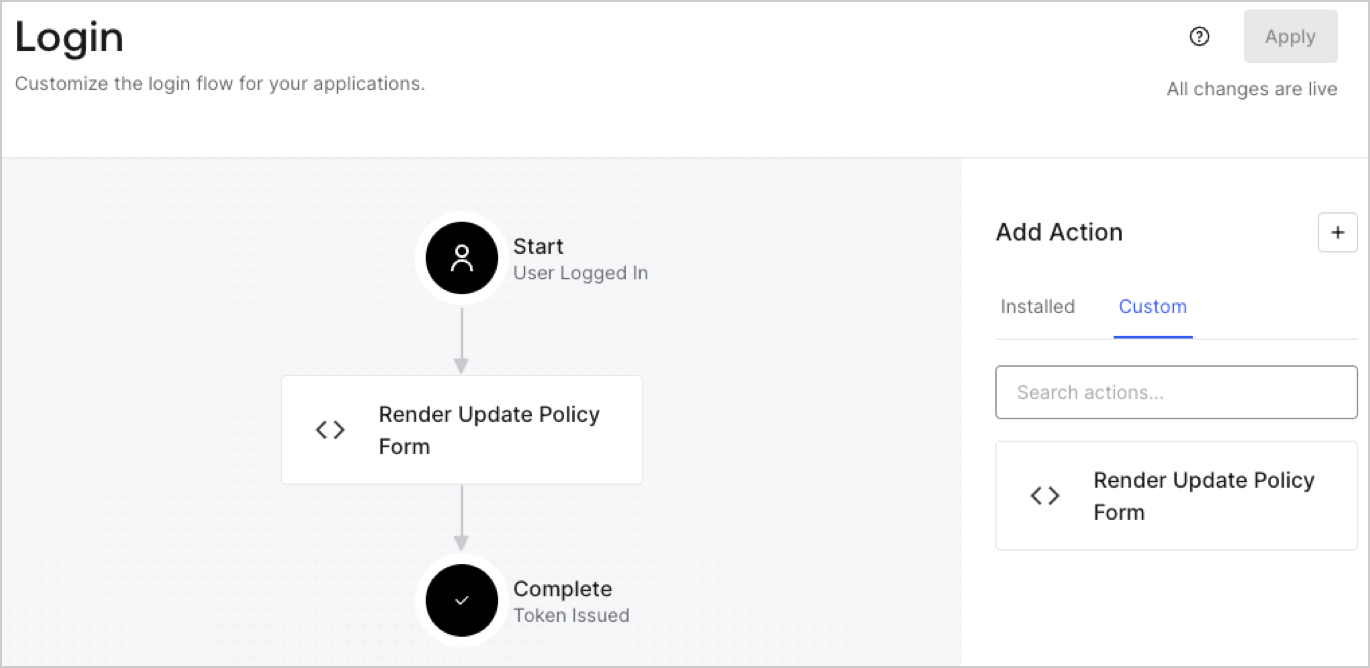
## Create a Post Login Action

Create a post-login Action to render your form by following these steps:

1. Navigate to **Auth0 Dashboard > Actions > Flows > Login.**
2. Select the **+** icon and Select **Build from scratch**:

   * **Name**: Enter `Render Update Policy Form`.
   * **Trigger**: Select `Login / Post Login`.
   * **Runtime**: Select the recommended version.
3. Select **Create**.

To configure the post-login Action:

1. Delete the existing code from the Code editor.
2. Paste the form render code into the Code editor.
3. Edit the code to define the conditional logic that will render the form.

   ```javascript lines theme={null}
   /**
   * @param {Event} event - Details about the user and the context in which they are logging in.
   * @param {PostLoginAPI} api - Interface whose methods can be used to change the behavior of the login.
   */
   exports.onExecutePostLogin = async (event, api) => {
     const FORM_ID = 'REPLACE_WITH_YOUR_FORM_ID';

     if (event.user.app_metadata.privacy_policies !== true) {
       api.prompt.render(FORM_ID);
     }
   }

   exports.onContinuePostLogin = async (event, api) => { }
   ```

   <Callout icon="file-lines" color="#0EA5E9" iconType="regular">
     The example code above will render the form when a user is missing the app metadata `privacy_policies` property.
   </Callout>
4. Select **Deploy.**
5. Drag and Drop the **Render Update Policy Form** Action to the **Login** flow.
   <Frame>
     <img src="https://mintcdn.com/docs-staging-react-sdk-reference/qXI8_RqDAqBmZBQt/docs/images/cdy7uua7fh8z/5TOwDgevZsBqd7yZynUYWU/41ca909dc3007aed4f40ff794a05efa5/postlogin.png?fit=max&auto=format&n=qXI8_RqDAqBmZBQt&q=85&s=e8782f49142580340882e6f3c359bd0f" alt="Dashboard > Forms > Use Case > Render update policy form login action" data-og-width="1370" width="1370" data-og-height="668" height="668" data-path="docs/images/cdy7uua7fh8z/5TOwDgevZsBqd7yZynUYWU/41ca909dc3007aed4f40ff794a05efa5/postlogin.png" data-optimize="true" data-opv="3" srcset="https://mintcdn.com/docs-staging-react-sdk-reference/qXI8_RqDAqBmZBQt/docs/images/cdy7uua7fh8z/5TOwDgevZsBqd7yZynUYWU/41ca909dc3007aed4f40ff794a05efa5/postlogin.png?w=280&fit=max&auto=format&n=qXI8_RqDAqBmZBQt&q=85&s=f195632f7b64858cfe0c5c96fb913e22 280w, https://mintcdn.com/docs-staging-react-sdk-reference/qXI8_RqDAqBmZBQt/docs/images/cdy7uua7fh8z/5TOwDgevZsBqd7yZynUYWU/41ca909dc3007aed4f40ff794a05efa5/postlogin.png?w=560&fit=max&auto=format&n=qXI8_RqDAqBmZBQt&q=85&s=2edf2ec643879f3a9eebba340c05e6e1 560w, https://mintcdn.com/docs-staging-react-sdk-reference/qXI8_RqDAqBmZBQt/docs/images/cdy7uua7fh8z/5TOwDgevZsBqd7yZynUYWU/41ca909dc3007aed4f40ff794a05efa5/postlogin.png?w=840&fit=max&auto=format&n=qXI8_RqDAqBmZBQt&q=85&s=c0e5ca302f027838a339b0346150468d 840w, https://mintcdn.com/docs-staging-react-sdk-reference/qXI8_RqDAqBmZBQt/docs/images/cdy7uua7fh8z/5TOwDgevZsBqd7yZynUYWU/41ca909dc3007aed4f40ff794a05efa5/postlogin.png?w=1100&fit=max&auto=format&n=qXI8_RqDAqBmZBQt&q=85&s=53d9e5378fa9cf97da77054af1b338b8 1100w, https://mintcdn.com/docs-staging-react-sdk-reference/qXI8_RqDAqBmZBQt/docs/images/cdy7uua7fh8z/5TOwDgevZsBqd7yZynUYWU/41ca909dc3007aed4f40ff794a05efa5/postlogin.png?w=1650&fit=max&auto=format&n=qXI8_RqDAqBmZBQt&q=85&s=8759f392ff56d6474fa551a59007a18b 1650w, https://mintcdn.com/docs-staging-react-sdk-reference/qXI8_RqDAqBmZBQt/docs/images/cdy7uua7fh8z/5TOwDgevZsBqd7yZynUYWU/41ca909dc3007aed4f40ff794a05efa5/postlogin.png?w=2500&fit=max&auto=format&n=qXI8_RqDAqBmZBQt&q=85&s=618acc8c6ea548ed7c1c6ceb50263aa6 2500w" />
   </Frame>
6. Select **Apply.**

### Test implementation

Test the implementation by following these steps:

1. Log in with an existing user whose app`_metadata` attribute `privacy_policies` does not have a value.
2. The post-login Action in the Login flow will render the form and prompt for acceptance.
3. Select **Auth0 Dashboard > User Management > Users,** locate the user and verify that the `app_metadata` attribute `privacy_policies` contains a `true` value and a timestamp.
